How to close a position fast in DeepCharts with one button: Cancel and Flat.
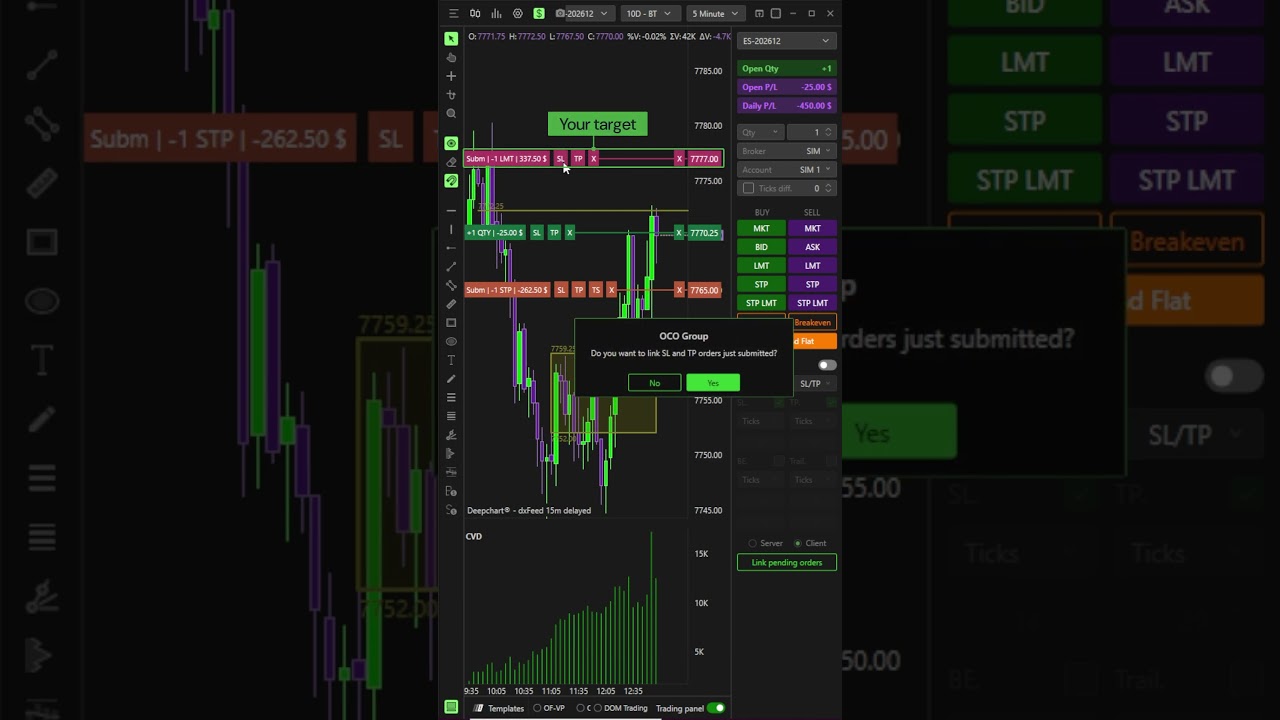
With a position open and a working order on the chart, Sell Market closes the position but leaves the order working. Cancel pulls the order but leaves the position open. Cancel and Flat does both in one click: the position is closed and every working order on that symbol is gone. It’s the orange button at the bottom of your trading panel.
DeepCharts is a paid platform available through an Optimus Futures account.
Want to learn more about Optimus Futures? Visit our website: https://optimusfutures.com/
Learn to Trade Futures: https://learn.optimusfutures.com
Our commissions, margins, and pricing: https://optimusfutures.com/Futures-Trading-Pricing.php
Open an account with us today! https://optimusfutures.com/Futures-Commodities-Trading-Account.php
Please don’t forget to like the video, comment, and subscribe! THANKS FOR WATCHING!
There is a substantial risk of loss in futures trading. Past performance is not indicative of future results. When considering technical analysis, please remember educational charts are presented with the benefit of hindsight. Market conditions are always evolving, and technical trading theories and approaches may not always work as intended. The placement of contingent orders by you or broker, or trading advisor, such as a “stop-loss” or “stop-limit-order, will not necessarily limit your losses to the intended amounts, since market conditions may make it impossible to execute such orders. The high degree of leverage that is often obtainable in commodity interest trading can work against you as well as for you. The use of leverage can lead to large losses as well as gains. Optimus Futures, LLC is not affiliated with nor does it endorse any trading system, methodologies, newsletter, or other similar service. We urge you to conduct your own due diligence.