This article on How to Choose a Trading VPS in 2026 is the opinion of Optimus Futures.
The right trading VPS in 2026 is a remote Windows server purpose-built for financial markets—not a repurposed web-hosting machine. For futures traders, that means Chicago- or Aurora-proximate hardware with sub-millisecond routing to CME.
For multi-asset traders spanning equities, forex, or options, it means data center proximity to the relevant exchange or liquidity venue, combined with hardware that can keep charting platforms, algorithms, and order management systems stable during volatility.
A trading VPS is not simply a faster internet connection. It is a professionally managed execution environment—one that protects open positions from power outages, ISP drops, and forced Windows updates. The latency benefit is real but secondary for most retail traders. The primary value is uptime, stability, and risk management.
This guide covers the specifications that define a trading-grade VPS, compares 10 leading providers across two distinct categories for 2026, and explains how to evaluate which type of infrastructure fits your trading style—whether you are a discretionary scalper, a systematic algo trader, or a developer building custom execution infrastructure.
Quick Guide: Which Trading VPS Do You Need?
- Trading CME futures (ES, NQ, CL, GC)? You need an Aurora/Chicago server with CME cross-connects. Recommended: QuantVPS.
- Running algorithmic strategies that require custom infrastructure? You need compute-optimized instances with granular control. Recommended: QuantVPS for turnkey CME execution, or AWS for fully custom builds.
- Need institutional-grade, multi-venue infrastructure? You need Equinix-hosted servers with exchange cross-connects. Recommended: Beeks Group.
- Want maximum flexibility and integration with data pipelines or ML? You need a major cloud platform with global reach. Recommended: AWS, Microsoft Azure, or Google Cloud Platform.
- Developer building lightweight bots or API-based execution? You may not need Windows at all. Recommended: Vultr, Linode, or DigitalOcean.
Trading-Grade VPS: Key Specifications at a Glance
Definition: A trading VPS is a remote Windows server hosted in a professional data center, optimized for the computational demands and low-latency requirements of financial trading platforms.
| Specification | Recommended Minimum | Notes |
|---|---|---|
| CPU Clock Speed | 3.5 GHz+ (Intel i7/i9 or AMD Ryzen 7/9) | Most trading platforms are single-threaded; clock speed matters more than core count |
| RAM | 4–8 GB (16 GB for multi-platform setups) | Budget 2–4 GB per platform instance |
| Storage | NVMe SSD | Mandatory for tick data, market depth, and footprint charts |
| Server Location | Aurora, IL or Chicago (for CME futures) | New York for equities; London/Tokyo for forex and global markets |
| Latency to Exchange | < 2 ms (sub-1 ms for algos) | Measured to the relevant matching engine, not a generic speed test |
| Uptime Guarantee | 99.9%+ SLA | Look for redundant power and network paths |
| Operating System | Windows Server 2019/2022/2025 | Required for most retail trading platforms |
Two Categories of Trading VPS: Trading-Specific vs. General Cloud
Not all VPS providers approach traders the same way. The market divides into two distinct categories, and understanding the difference is critical before choosing a provider.
Trading-specific VPS providers (such as QuantVPS and Beeks Group) build their infrastructure around financial markets. Their servers are located in exchange-proximate data centers by design. Their support teams understand Rithmic, CQG, and platform configuration. Many offer pre-configured images with trading software ready to go. You are paying for domain expertise in addition to hardware.
General cloud infrastructure providers (such as AWS, Microsoft Azure, Google Cloud Platform, OVHCloud, Vultr, DigitalOcean, and Kamatera) offer powerful, scalable virtual machines that can be configured for trading—but arrive as blank canvases. You select the region, provision the instance, install Windows, configure your platforms, optimize network settings, and troubleshoot issues yourself.
There is no trading-aware support team—and if you want human support at all, it is typically a paid add-on that covers only infrastructure, not trading applications. If your Rithmic connection drops at [9:29] AM ET, you are filing a generic infrastructure ticket, not calling someone who understands what that means for your open positions.
The key distinction is not raw hardware quality. AWS and Vultr run world-class infrastructure. The distinction is who configures it, who supports it, and who understands your use case. For self-sufficient developers and quant teams, general cloud providers offer unmatched flexibility. For active traders who want a turnkey execution environment, trading-specific providers eliminate operational risk.
Provider Comparison: 10 Trading VPS Options for 2026
| Rank | VPS Provider | Category | Best For | Location Strengths |
|---|---|---|---|---|
| 1 | QuantVPS | Trading-Specific | CME Futures (Overall) | Chicago / Aurora |
| 2 | Amazon Web Services (AWS) | General Cloud | Best Raw Infrastructure (High Complexity) | Global (incl. Chicago Local Zone) |
| 3 | Beeks Group | Trading-Specific | Institutional & Regulated Firms | Global (Equinix network) |
| 4 | Microsoft Azure | General Cloud | Enterprise Teams & Hybrid Cloud | Global (incl. Illinois, Virginia) |
| 5 | Google Cloud Platform | General Cloud | ML/Data Integration & Quant Research | Global (incl. Iowa, Virginia) |
| 6 | Kamatera | General Cloud | Scalable Enterprise / Devs | Global (incl. Chicago, NYC) |
| 7 | OVHcloud | General Cloud | Budget-Conscious Self-Managed | Global (U.S., EU, APAC) |
| 8 | Vultr | General Cloud | Developer-Traders & API Automation | Global (incl. Chicago, NJ) |
| 9 | Linode (Akamai) | General Cloud | Chicago-Proximate Dev Option | Global (incl. Chicago, Newark) |
| 10 | DigitalOcean | General Cloud | Lightweight Bots & Microservices | Global (incl. NYC, SFO) |
What a Trading VPS Actually Does
A Virtual Private Server (VPS) is a remote Windows machine hosted in a professional data center that traders access via Remote Desktop Protocol (RDP). Unlike your home computer, a VPS remains online around the clock with redundant power, enterprise-grade internet, and 24/7 monitoring.
For traders using platforms like Optimus Flow, Sierra Chart, or Rithmic-based front ends, the VPS becomes the always-on execution hub—running your strategies, managing your risk parameters, and keeping your positions protected regardless of what happens to your local hardware or internet connection.
Core Functions
Risk Management: Server-side logic—OCO brackets, trailing stops, and protective orders—remains active even if your home connection fails. If your ISP goes down mid-session, you can reconnect to your VPS from a phone, tablet, or backup device and manage your position immediately.
Automation: A VPS runs scripts, trade copiers, and algorithmic strategies continuously without requiring your local PC to stay powered on. This is essential for any strategy that operates outside regular trading hours or requires persistent uptime.
Latency Normalization: Hosting near the exchange stabilizes routing and reduces jitter compared to long-haul retail internet paths. For futures traders, an Aurora-proximate VPS eliminates the geographic lottery of residential ISP routing.
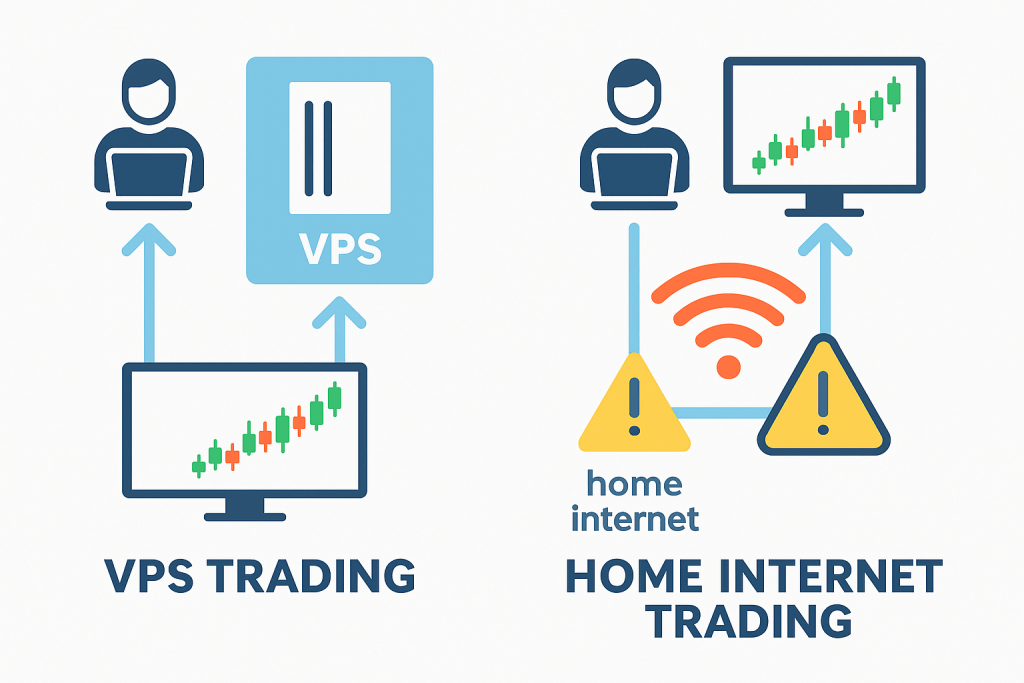
Important: A VPS cannot mitigate exchange halts, broker outages, data feed interruptions, or routing issues that occur beyond your own infrastructure. It protects the link between you and your broker—not the entire chain.
Stability vs. Latency: Understanding the Real Priority
Definition: Latency is the round-trip network time between your platform and the exchange matching engine. Stability is the consistency and reliability of that connection over time.
For most discretionary traders, stability matters more than single-digit milliseconds. A manual trader will not notice the difference between 2 ms and 15 ms of latency—human reaction time is roughly 200–300 ms. But that same trader will absolutely notice a jittery connection that causes delayed order updates, frozen DOM ladders, or platform disconnections during a fast market.
For discretionary traders, uptime is the priority. A VPS ensures you can manage your position from any device if your primary connection fails. The value proposition is insurance against infrastructure failure during leveraged exposure.
For algorithmic traders, location is the priority. Aurora-proximate VPS hosts provide consistent, near-zero latency that helps preserve queue priority and execution efficiency. Algo strategies are sensitive to latency variance (jitter), not just average latency.
For multi-asset traders, venue proximity matters. If you trade CME futures and also run forex strategies through London-based liquidity providers, you may need VPS infrastructure in multiple locations—or a provider with a global data center footprint.
The Trading-Grade Checklist: Specs That Matter
Definition: A trading-grade specification checklist is a minimum standard of hardware and network characteristics required for reliable execution across financial markets.
CPU: Clock Speed Over Core Count
Most trading platforms—including Sierra Chart, Optimus Flow, and MetaTrader—are predominantly single-threaded. This means a CPU with fewer cores but higher clock speeds will outperform a many-core server chip running at lower frequencies.
Target: 3.5 GHz+ per core (AMD Ryzen 7/9, Intel i7/i9)
Avoid: Low-clock Xeon-based VPS plans marketed for web hosting, which prioritize core count over per-core performance
Storage: NVMe Is Non-Negotiable
Tick data, market depth history, and footprint charts generate heavy read/write loads. NVMe SSDs deliver the throughput required to keep platforms responsive during high-volatility periods when data bursts spike dramatically. Standard SATA SSDs are measurably slower under these conditions.
Server Location: Match the Exchange
The optimal VPS location depends entirely on which markets you trade:
| Market | Exchange Location | Optimal VPS Location |
|---|---|---|
| CME Futures (ES, NQ, CL, GC, 6E) | Aurora, Illinois | Aurora or Chicago |
| NYSE / NASDAQ Equities | Mahwah, NJ / Carteret, NJ | New York Metro / New Jersey |
| Forex (Major LPs) | London, New York, Tokyo | Depends on LP and broker |
| Eurex | Frankfurt | Frankfurt |
For CME futures traders, Aurora or Chicago is the standard. New York is acceptable for multi-asset traders who also need proximity to equity venues. West Coast, European, and Asian locations should generally be avoided for CME-focused strategies.
Uptime and Support
Target: 99.9% uptime SLA or higher (99.99% for critical algo infrastructure)
Support: For trading-specific providers, look for teams familiar with Rithmic, CQG, and trading platform configuration. For general cloud providers, expect infrastructure-level support only—you own the application layer.
Platform Compatibility: Match Your VPS to Your Software
Different trading platforms place different demands on VPS hardware. Choosing the wrong configuration for your platform is one of the most common mistakes traders make when setting up remote infrastructure.
High-CPU platforms (Sierra Chart, MultiCharts): These are resource-intensive and single-threaded. They require 3.5 GHz+ clock speeds and at least 4 GB RAM per instance. Avoid generic cloud hosts with underclocked server CPUs.
Order flow and visualization platforms (Optimus Flow, Bookmap, Jigsaw): These benefit from dedicated GPU resources or high RAM allocation for rendering dense market depth visualizations. QuantVPS offers configurations optimized for these workloads, including optional GPU acceleration.
Web-based platforms (TradingView): A VPS is generally unnecessary for browser-based charting unless you are running automated webhook-driven strategies or broker-connected alerts that need persistent uptime.
Algorithmic and API-based execution: If your strategy runs as a Python script, C++ binary, or API-based bot rather than through a GUI platform, you may not need a Windows VPS at all. Lightweight Linux instances on Vultr, Linode, or DigitalOcean can be more cost-effective for headless execution.
VPS Providers: 2026 In-Depth Comparison
The following analysis covers each provider in ranked order. Providers span both trading-specific and general cloud categories—each section notes the category and what type of trader it serves. For context on the distinction between these two categories, see the framework above.
1. QuantVPS — Best for CME Futures (Overall)
Category: Trading-Specific | Location: Chicago / Aurora | Starting Price: ~$59.99/mo
QuantVPS is purpose-built for algorithmic and active futures traders. It runs on bare-metal AMD Ryzen and EPYC systems engineered specifically for low-latency futures execution. Each trading VPS includes dedicated high-clock CPU allocations, high-frequency NVMe storage, and DDR4/DDR5 memory configurations up to 192 GB—eliminating noisy-neighbor contention and preserving deterministic performance during volatile market events.
Deployed inside CME-adjacent Chicago data centers, QuantVPS consistently achieves sub-1 ms routing to major futures gateways such as Rithmic and CQG. This results in faster order flow, more responsive charting, and improved automation stability compared to generic cloud VPS providers.
Every instance ships pre-tuned for trading workloads, with Windows Server 2022 or 2025, optional GPU acceleration for visualizers such as Bookmap, and scalable 10 Gbps uplink options for traders or firms running parallel strategies and high-throughput algorithms.
Why it stands out: QuantVPS delivers infrastructure comparable to what a team would build on AWS or bare-metal colocation—Ryzen-class CPUs, NVMe storage, fiber cross-connects to CME—but packages it with trading-specific configuration, pre-optimized images for Rithmic and Optimus Flow, and hands-on technical support included at no additional cost.
That last point deserves emphasis: QuantVPS support staff understand Rithmic connections, CQG gateway configuration, and platform-specific troubleshooting. If something breaks at [9:28] AM ET, you are talking to someone who knows what that means for your open positions—not submitting a generic infrastructure ticket. By comparison, AWS charges $29–$100+/month for paid support tiers that cover infrastructure only, not trading applications.
A quant team could replicate QuantVPS-caliber hardware on AWS, but they would spend hours on provisioning, network tuning, and Windows configuration that QuantVPS handles out of the box—and they still would not have anyone to call about a Rithmic disconnect. For traders who want institutional-grade hardware without the DevOps overhead or the hidden support costs, this is the value proposition.
Key Specs
- Ryzen/EPYC CPUs with dedicated clock allocations
- NVMe storage, DDR4/DDR5 RAM
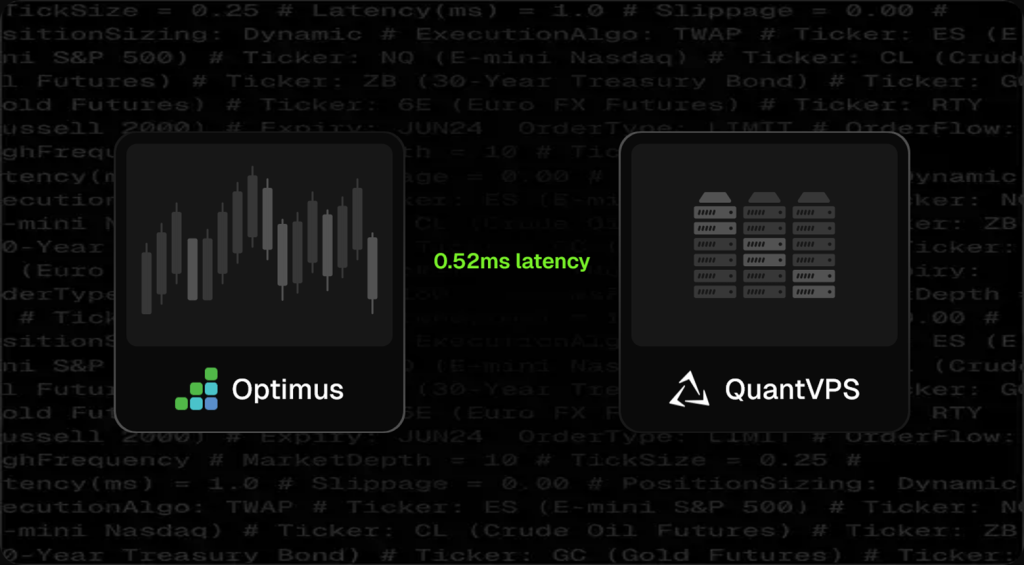
- Sub-1 ms latency to CME (as low as 0.52 ms)
- Pre-configured for Rithmic, CQG, and Optimus Flow
- Free hands-on technical support (Rithmic, CQG, and platform troubleshooting included)
Best for: Scalpers, automated strategy runners, high-frequency discretionary traders, and anyone prioritizing CME proximity with turnkey setup.
Head-to-Head: QuantVPS vs. AWS for CME Futures
| Feature | QuantVPS | AWS (EC2 Chicago) |
|---|---|---|
| Setup Time | ~5 minutes (pre-configured) | 2–4 hours (manual provisioning) |
| Trading Platform Support | Included free (Rithmic, CQG, platform help) | None (infrastructure tickets only) |
| CME Latency | Sub-1 ms (fiber cross-connect) | Variable, 1–3 ms without manual tuning |
| Windows Licensing | Included | Additional cost |
| Monthly Cost | Flat rate (~$59.99+) | Variable (~$70–$150+ with Windows, storage, networking) |
| Support Cost | $0 (included) | $0 for docs only; $29–$100+/mo for human support |
| Best For | Traders | Developer teams |
Recommended setup: Get the Optimus-Optimized CME VPS from QuantVPS
2. Amazon Web Services (AWS) — Best Raw Infrastructure (High Complexity)
Category: General Cloud | Location: Global (25+ regions including US-East, US-West, Chicago Local Zone)
AWS is the world’s largest cloud infrastructure provider and powers a significant portion of institutional trading technology. In terms of raw compute power, network sophistication, and global reach, AWS is unmatched. It offers compute instances (EC2) with virtually unlimited configuration options—from general-purpose instances to compute-optimized C-series machines with high clock speeds suitable for trading workloads.
For trading, the relevant AWS regions are US East (N. Virginia) and US East (Ohio), which provide reasonable proximity to both CME (Aurora) and equity venues (New Jersey). AWS also operates a Local Zone in Chicago, which can provide lower-latency access to CME for teams willing to configure it. The infrastructure is genuinely world-class—this is what major banks, hedge funds, and prop firms build on.
The tradeoff is equally clear: AWS provides the best raw infrastructure available, but at significant cost and complexity—and with zero trading-domain support. There is no pre-configured Windows trading image. There is no one to call if your Rithmic connection behaves unexpectedly. Platform installation, Windows licensing, network tuning, security hardening, and ongoing maintenance are entirely your responsibility.
AWS support is tiered and paid separately: the Basic tier (free) provides documentation access only—no human support. Developer support starts at $29/month. Business support starts at $100/month. Critically, none of these tiers cover trading platform configuration, data feed troubleshooting, or broker connectivity issues.
AWS will help with an EC2 instance that won’t boot; they will not help with a CQG gateway that won’t connect or a Rithmic login that times out. For comparison, trading-specific providers like QuantVPS include hands-on, platform-aware technical support at no additional cost beyond the base subscription.
Why it ranks #2: Pure infrastructure capability. If you have the technical skill to harness it, AWS can do anything. But for most active traders, the combination of complexity, cost, and absent trading support means AWS is overkill. It earns its ranking on raw power, not on practical suitability for the typical futures trader.
Key Specs
- EC2 instances with compute-optimized options (C-series: high clock speed)
- Chicago Local Zone available for CME proximity
- Pay-as-you-go pricing (can become expensive for always-on Windows instances)
- Extensive networking options (VPC, placement groups, enhanced networking)
- Support: Free tier = docs only; paid tiers ($29–$100+/mo) = infrastructure only
Best for: Quant teams, trading firms with DevOps resources, developers building custom execution infrastructure, and traders who need to integrate trading with broader cloud services (data pipelines, ML model serving, etc.).
Consideration: A comparable always-on Windows instance on AWS (with Windows licensing, storage, and networking) often costs more per month than a pre-configured trading VPS from a specialized provider—and requires significantly more setup and ongoing maintenance time.
3. Beeks Group — Best for Institutional & Regulated Firms
Category: Trading-Specific | Location: Global (Equinix data centers)
Beeks Group operates within the Equinix data center ecosystem, which houses many of the world’s major exchanges, banks, and liquidity providers. This makes Beeks a strong fit for institutional traders, prop firms, and regulated entities that require proximity to multiple venues and compliance-grade infrastructure.
Beeks offers both VPS and bare-metal dedicated server options with managed services. Their infrastructure spans key financial hubs including New York, Chicago, London, Tokyo, Hong Kong, and Singapore. For firms that need cross-connects to specific exchange matching engines or require SOC-certified hosting environments, Beeks provides the institutional framework.
Key Specs
- Equinix-hosted infrastructure across global financial hubs
- VPS and dedicated bare-metal options
- Managed services and compliance-grade environments
- Cross-connect capability to exchanges and liquidity providers
Best for: Prop firms, institutional desks, regulated entities, and multi-venue traders requiring enterprise-grade managed hosting with exchange proximity.
Note: Beeks is priced at institutional levels and may exceed the budget of most individual retail traders. For retail CME futures traders seeking similar proximity at accessible pricing, QuantVPS offers a more cost-effective path to Chicago/Aurora data center hosting.
4. Microsoft Azure — Best for Enterprise Teams & Hybrid Cloud
Category: General Cloud | Location: Global (60+ regions including Illinois, Virginia, Iowa)
Microsoft Azure is the second-largest cloud platform globally and a natural fit for organizations already embedded in the Microsoft ecosystem. Azure’s compute offerings include D-series and F-series VMs with high clock speeds suitable for trading workloads, and its Central US region (Iowa) provides reasonable proximity to CME infrastructure.
Azure’s strength for trading teams lies in hybrid cloud capability—connecting on-premise infrastructure with cloud resources—and deep integration with Microsoft tools (Active Directory, SQL Server, Power BI). For firms that already run their back-office and analytics on Microsoft infrastructure, Azure simplifies the stack by keeping trading compute within the same ecosystem.
Like AWS, Azure provides zero trading-specific support. All platform configuration, Windows optimization, and broker connectivity troubleshooting is the user’s responsibility. Azure support plans are paid add-ons covering infrastructure only.
Key Specs
- Compute-optimized F-series VMs with high clock speeds
- Central US (Iowa) and East US (Virginia) regions for exchange proximity
- Deep Microsoft ecosystem integration (Active Directory, SQL Server, .NET)
- Hybrid cloud connectivity for firms bridging on-premise and cloud
Best for: Enterprise trading teams already invested in the Microsoft ecosystem, firms needing hybrid cloud connectivity, and organizations requiring Azure-specific compliance certifications.
5. Google Cloud Platform (GCP) — Best for ML/Data Integration & Quant Research
Category: General Cloud | Location: Global (40+ regions including Iowa, Virginia, South Carolina)
Google Cloud Platform stands out for its data and machine learning capabilities. For quantitative trading teams that combine execution with research—running backtests, training ML models, processing large datasets—GCP offers a tightly integrated stack that connects compute, storage, BigQuery analytics, and TensorFlow/Vertex AI within a single environment.
GCP’s us-central1 (Iowa) region provides reasonable Midwest proximity, though it is not as close to Aurora as dedicated Chicago data centers. The platform’s compute-optimized C2 and C2D instances offer high per-core performance suitable for trading workloads.
As with all general cloud providers, GCP offers no trading-specific support. There are no pre-configured trading images, and all platform installation and network optimization is self-service.
Key Specs
- Compute-optimized C2/C2D instances with high per-core performance
- us-central1 (Iowa) for Midwest proximity
- Native BigQuery, TensorFlow, and Vertex AI integration
- Strong Kubernetes and containerization support
Best for: Quant research teams combining execution with ML model development, firms needing integrated data pipelines alongside trading compute, and developers building containerized trading architectures.
6. Kamatera — Best for Scalable Enterprise & Developers
Category: General Cloud | Location: Global (including Chicago, NYC, Dallas, and 13+ global locations)
Kamatera provides highly customizable virtual machines with instant resource scaling and hourly billing options. Chicago and NYC locations make it viable for CME and equity-proximate deployments. Kamatera’s granular configuration—choose exact CPU cores, RAM, and storage independently—appeals to developers and quants who want fine-grained control over their server architecture.
Best for: Developers, quants, and technically sophisticated traders who want customizable cloud infrastructure with flexible billing and the ability to scale resources on demand.
7. OVHcloud — Best for Budget-Conscious Self-Managed
Category: General Cloud | Location: Global (U.S., Europe, Asia-Pacific, Canada)
OVHcloud offers bare-metal dedicated servers and VPS instances at highly competitive price points. For traders comfortable with Linux or Windows server administration, OVHcloud provides strong hardware value—particularly their dedicated server line, which delivers raw performance comparable to more expensive providers.
OVHcloud operates U.S. data centers (including a presence in the eastern U.S.) and has a large European footprint, making it relevant for traders who need infrastructure in both regions.
Key Specs
- Bare-metal and VPS options
- Competitive pricing for dedicated hardware
- Anti-DDoS protection included
- U.S. and European data center locations
Best for: Budget-conscious traders comfortable with self-managed server administration, European traders needing EU-based hosting, and anyone seeking dedicated hardware at competitive rates.
Note: OVHcloud does not offer trading-specific configuration or support. All platform installation and optimization is self-service.
8. Vultr — Best for Developer-Traders & API Automation
Category: General Cloud | Location: Global (32 locations including Chicago, New Jersey, Dallas)
Vultr offers cloud compute, bare metal, and optimized cloud instances with straightforward pricing and an API-first design philosophy. The Chicago location is particularly relevant for CME futures traders who prefer to manage their own infrastructure. Vultr’s “High Frequency” compute tier provides NVMe storage and high-clock CPUs suitable for trading workloads.
Vultr appeals to developer-traders who want to programmatically provision, manage, and monitor their trading infrastructure through APIs and automation scripts.
Key Specs
- High Frequency compute with NVMe and high-clock CPUs
- Chicago and New Jersey data center locations
- API-first management and automation
- Bare metal options available
Best for: Developer-traders who want API-driven infrastructure management, algo traders comfortable with server provisioning, and those seeking Chicago-proximate cloud compute at competitive pricing.
9. Linode (Akamai) — Best for Chicago-Proximate Developer Option
Category: General Cloud | Location: Global (including Chicago, Newark, and 20+ global locations)
Linode, now part of Akamai’s cloud computing division, offers straightforward cloud compute with a developer-friendly interface and competitive pricing. The Chicago data center makes Linode particularly relevant for CME-focused developers and algo traders who want Midwest proximity without the complexity of AWS or Azure.
Linode’s Dedicated CPU instances provide guaranteed compute resources without noisy-neighbor contention—an important consideration for latency-sensitive trading workloads. Pricing is transparent and predictable, with no hidden bandwidth or egress charges that can inflate costs on larger cloud platforms.
Key Specs
- Dedicated CPU instances with guaranteed resources
- Chicago and Newark data center locations
- Predictable pricing with no hidden egress fees
- Now backed by Akamai’s global network infrastructure
Best for: Developer-traders who want Chicago-proximate cloud compute with simple, predictable pricing and no noisy-neighbor contention.
10. DigitalOcean — Best for Lightweight Bots & Microservices
Category: General Cloud | Location: Global (NYC, SFO, Toronto, London, Singapore, and others)
DigitalOcean is known for developer-friendly simplicity and competitive pricing on smaller instances. While not traditionally associated with trading, DigitalOcean’s droplets can serve as lightweight execution environments for simple trading bots, alert systems, data collection scripts, and microservice-based trading architectures.
DigitalOcean is not the best fit for running full Windows-based trading platforms (their strength is Linux-based workloads). However, for Python-based algo execution, webhook-driven automation, or API-based trading bots that don’t require a Windows GUI, DigitalOcean provides a clean, affordable hosting option.
Key Specs
- Simple, predictable pricing
- NYC and SFO data center locations
- Strong developer tooling and documentation
- Best suited for Linux-based workloads
Best for: Developers running lightweight trading bots, webhook-based automation, data aggregation services, or microservice architectures that don’t require Windows GUI platforms.
Note: If your trading workflow requires Windows-based platforms like Sierra Chart, or Optimus Flow, a Windows-optimized trading VPS (like QuantVPS) is a better fit than DigitalOcean.
Trading-Specific vs. General Cloud: Decision Framework
Choosing between a trading-specific VPS and general cloud infrastructure depends on your technical capability, trading style, and how you value your time.
| Factor | Trading-Specific VPS | General Cloud (AWS, Azure, GCP, etc.) |
|---|---|---|
| Setup Time | Minutes (pre-configured) | Hours to days (manual) |
| Trading Support | Included free; platform-aware staff | Paid tiers ($29–$100+/mo); infrastructure-only |
| Exchange Proximity | Optimized by design | Available but requires research |
| Windows Licensing | Included | Often additional cost |
| Customization | Moderate (plan-based) | Unlimited |
| Scalability | Plan upgrades | Instant, granular |
| Best For | Active traders | Dev teams, quants, firms |
| Monthly Cost (comparable specs) | $49–$150 | $50–$200+ (with Windows) |
Choose a trading-specific VPS if you want to be trading within 30 minutes of signup, you value having support that understands your platforms, and you don’t want to manage server infrastructure.
Choose general cloud if you have DevOps experience, you need integration with broader cloud services (data pipelines, ML, databases), or you require infrastructure that a standard VPS plan can’t accommodate.
How to Test Your Latency to CME
Definition: A latency test measures round-trip packet travel time between your computer (or VPS) and an exchange gateway, expressed in milliseconds.
Steps
- Open Command Prompt (or Terminal on your VPS)
- Enter:
ping futures.rithmic.com - Review the average latency value after several packets
Latency Guide
| Your Latency | What It Means | VPS Recommendation |
|---|---|---|
| < 20 ms | Very close to CME; a VPS helps mainly with stability and redundancy | VPS adds uptime value, marginal latency gain |
| 20–50 ms | Typical for many retail traders; a VPS can meaningfully improve consistency | Strong case for Chicago/Aurora VPS |
| > 100 ms | Distant from CME; a VPS near Aurora will substantially improve order routing | VPS strongly recommended for active trading |
Frequently Asked Questions
Do traders need a VPS for trading in 2026?
Not always. Traders who value uptime, consistency, or automation benefit most. If you hold leveraged positions and your home internet is your single point of failure, a VPS provides meaningful risk reduction. Casual traders with small positions and no automation may not need one.
Does a VPS improve execution speed?
It can reduce latency depending on the VPS location relative to the exchange, but the primary benefit for manual traders is stability and uptime—not raw speed. Algorithmic traders see more direct latency benefits from exchange-proximate hosting.
Is VPS hosting beginner-friendly?
Yes, when using trading-specific providers. Most trading VPS setups operate like a standard Windows desktop—you connect via Remote Desktop and use your platforms normally. General cloud providers require more technical knowledge for initial setup.
What is the best VPS location for futures trading?
For CME futures (ES, NQ, CL, GC, 6E), Chicago or Aurora, Illinois is optimal due to proximity to CME’s matching engines. For equities, New Jersey. For forex, it depends on your broker’s liquidity provider location.
Which platforms benefit most from VPS hosting?
Optimus Flow, Sierra Chart, TradingView (broker-connected), MultiCharts, CQG, and Rithmic-based platforms all benefit from improved uptime and stable routing. Any platform that maintains a persistent connection to a data feed or order routing server benefits from VPS reliability.
Can I run multiple platforms on one VPS?
Yes, with sufficient resources. A common guideline is 2–4 GB of RAM per platform instance, depending on chart load and historical data usage. If running charting and execution on separate platforms simultaneously, budget toward the higher end.
Do I still need good home internet?
Yes. The VPS protects your execution environment, but you still need a stable connection to access and control it via Remote Desktop. The critical difference: if your home internet drops, your orders and protective stops remain active on the VPS. You can reconnect from any device.
What is the difference between a VPS, colocation, and cloud hosting?
A VPS is virtualized hosting at a relatively low monthly cost (often $49–$150). Colocation is dedicated hardware housed inside or near the exchange ecosystem, priced at institutional levels (often $2,000+ per month). Cloud hosting (AWS, Azure, GCP, Vultr, etc.) provides on-demand virtual machines with granular resource control and pay-as-you-go billing. For most retail traders, a high-quality trading VPS provides the best cost-benefit balance.
Can I use AWS or cloud providers for trading?
Yes, but you should expect to handle all configuration yourself. Cloud providers (AWS, Azure, GCP, Vultr, etc.) do not offer trading-specific support, pre-installed platforms, or exchange-optimized networking out of the box. They are best suited for traders or teams with technical infrastructure experience.
What is the difference between trading-specific and general cloud VPS?
Trading-specific VPS providers pre-configure servers for financial markets with exchange-proximate locations, trading platform support, and optimized Windows images. General cloud providers offer raw infrastructure that can be configured for any purpose, including trading, but require the user to handle all setup and optimization independently.
Do cloud providers like AWS offer trading support?
No. Major cloud providers (AWS, Microsoft Azure, Google Cloud Platform, Vultr, DigitalOcean, OVHcloud) provide infrastructure-level support only—and often charge separately for it. They will not help configure trading platforms, troubleshoot data feed connections, or resolve broker connectivity issues. Trading-specific VPS providers like QuantVPS typically include hands-on, platform-aware technical support at no additional cost, covering Rithmic, CQG, and trading platform configuration.
Optimus Futures Trader’s VPS Toolkit
- Infrastructure — Recommended VPS: Get the Optimus-Optimized QuantVPS Setup (includes pre-configuration for Rithmic and Optimus Flow)
- Platform — Optimus Flow: Download the Free Optimus Flow Platform (professional-grade DOM, footprint charts, and TPO)
- Education — New to futures? Learn more at the Optimus Futures Learn Center
Ready to Trade? Open a live futures trading account with low day-trading margins
Disclaimer
The VPS providers mentioned in this article are listed for informational purposes only. Their inclusion does not constitute an endorsement, recommendation, or guarantee by Optimus Futures. Each trader is responsible for evaluating, selecting, and managing their own VPS service. Optimus Futures does not control, monitor, or take responsibility for the operation, reliability, or performance of any third-party VPS provider.
A VPS cannot prevent issues related to trading APIs, data feeds, routing, or exchange connectivity. If an API, platform, or data provider experiences an outage, a VPS will not resolve those interruptions. Traders should conduct their own due diligence and understand the risks before using any VPS for trading activities.
The information above was gathered from internet sources. While we strive for accuracy, Optimus Futures, LLC cannot guarantee completeness or freedom from errors. We encourage you to conduct your own due diligence, and we always welcome corrections brought to our attention.
There is a substantial risk of loss in futures trading. Past performance is not indicative of future results.