You trade on TradingView.
Your journal fills itself.
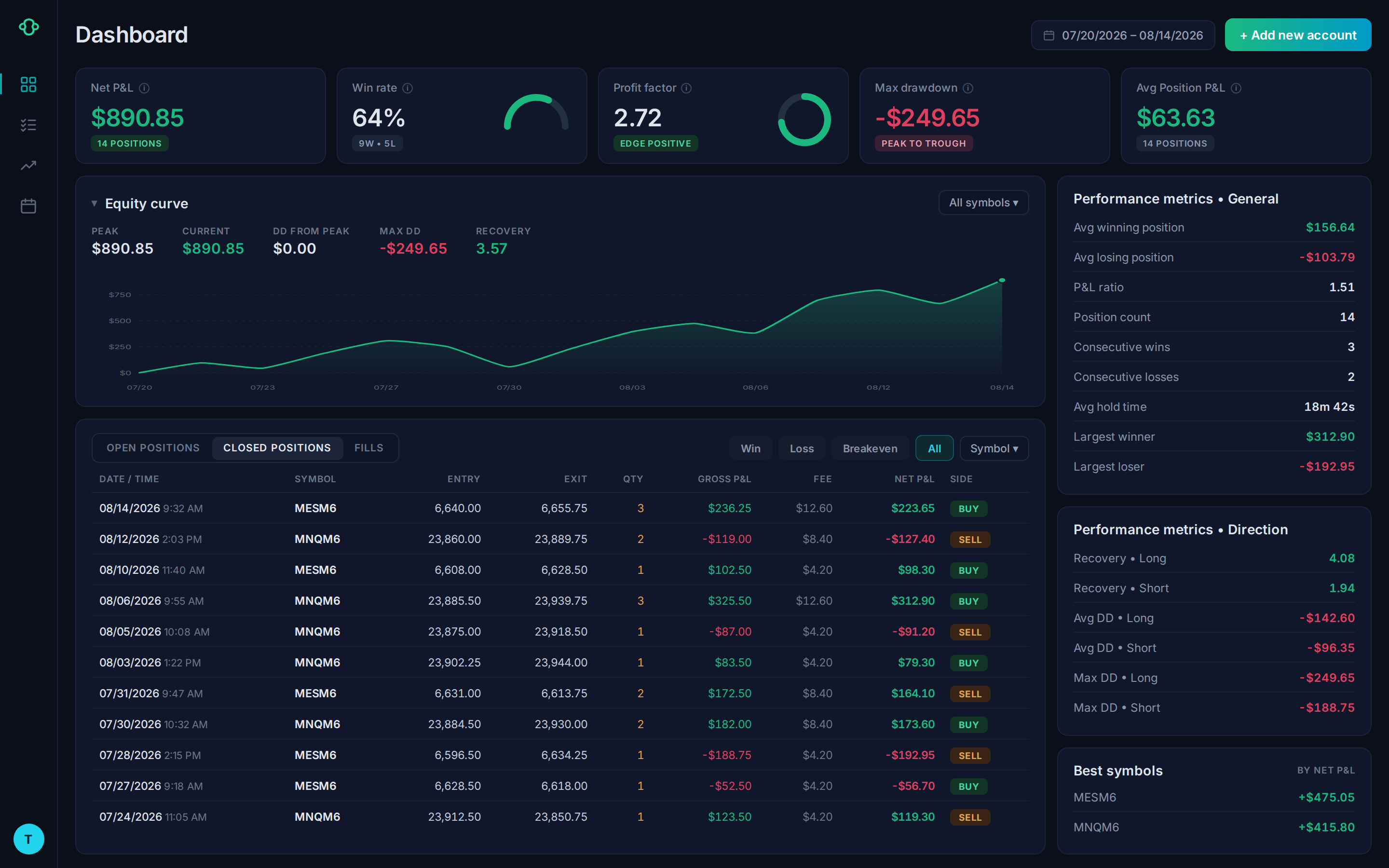
Connect Optimus as your broker on TradingView and every single fill records in your journal automatically, in real time. No CSV exports, no manual entry, no broken imports. Just open a chart and trade.
funded account
on every fill
futures instruments
Simulated data shown for illustrative purposes only.
Standalone journals: $20–$50/mo
Real-Time Sync — Not End of Day
Trades appear the moment they fill. Not after you export a CSV. Not when you remember to import. Instantly.
Built for Futures, Not Bolted On
Understands contract specs, margin, and the instruments futures traders actually use — ES, NQ, MES, CL, and more.
Broker-Integrated, Not Third-Party
Your journal connects directly to your Optimus account. No third-party bridge, no data mismatch, no subscription to manage.
TradingView Native
Designed to work hand-in-hand with TradingView. Trade on the world's most popular charting platform, review in your journal automatically.
The Problem With TradingView Export
TradingView traders deserve
a journal that just works.
TradingView trade exports may contain missing P&L data, inconsistent fields, or columns that require manual cleanup. When you connect your Optimus account, compatible trade data is imported directly into the journal, reducing the need to organize exported files manually.
The Old Way
Export CSV from TradingView. Clean broken data manually. Import to journal. Realize P&L is missing. Start over tomorrow.
The Typical Answer
Pay $20–$50/month for a standalone journal that still requires manual imports or a fragile third-party sync.
The Optimus Way
Connect Optimus on TradingView. Your journal fills itself the moment each trade executes. $5/month. No exports. No workarounds.
Setup in Minutes
Three Steps to Automatic Journaling
No software to install. No spreadsheets. Your journal starts filling itself the moment you place your first trade.
Currently available for TradingView users. Optimus Flow coming soon.
Open an Optimus Futures Account
Under 10 minutes. $500 minimum deposit. Your journal activates automatically on funding.
Connect Optimus on TradingView
Open TradingView's broker panel, select Optimus Futures, and log in with your CQG credentials. Done.
Trade and Review
Trade normally. Every fill appears in your journal instantly. Nothing to import, ever.
Real-Time Sync
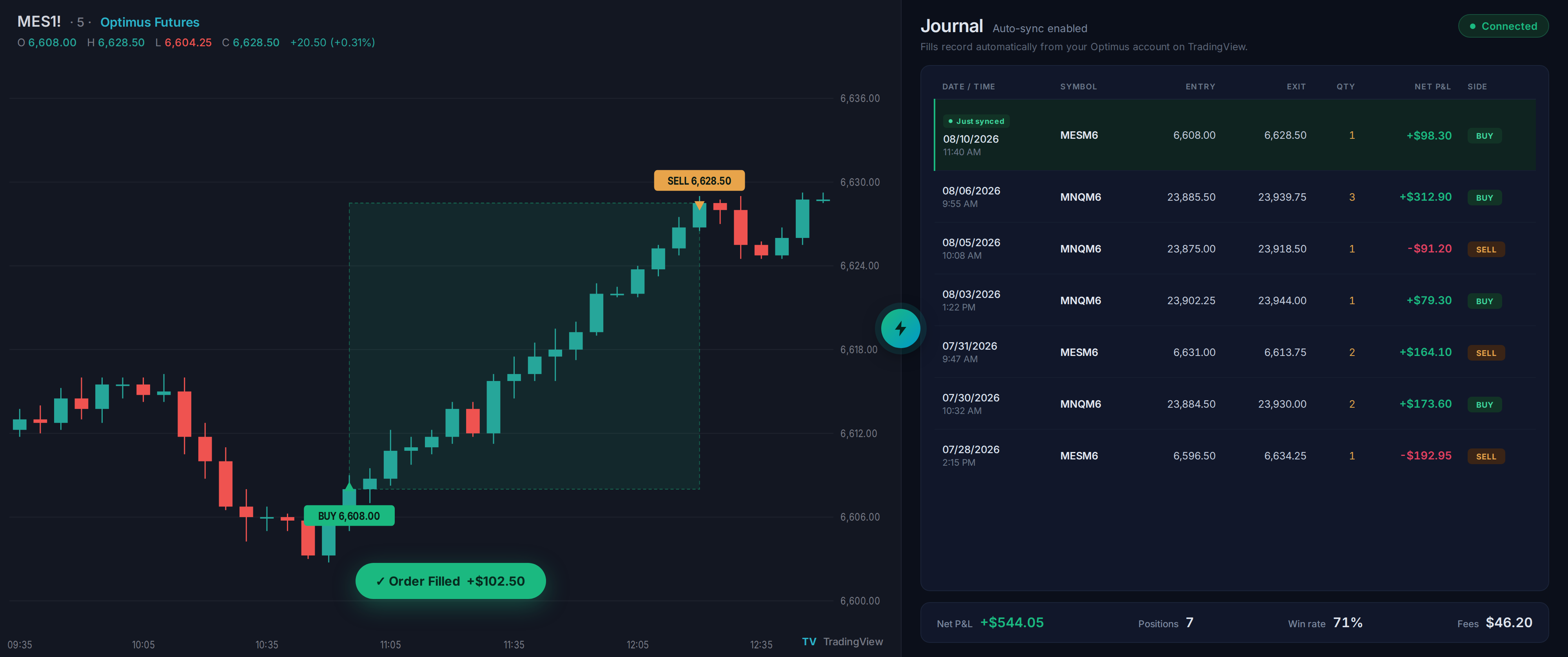
The moment it fills, it's in your journal.
TradingView trade exports may require additional formatting or manual cleanup before the data can be analyzed. Every other journal that "integrates" with TradingView still depends on that broken export. Ours doesn't. We connect directly to your live account.
- Instant sync on every fill — no end-of-day routine
- Entry, exit, contracts, and P&L captured automatically
- No CSV exports, no manual entries, no data errors
- Works across futures on TradingView with Optimus
Simulated data shown for illustrative purposes only.
Performance Analytics
The stats that tell you
if your edge is real.
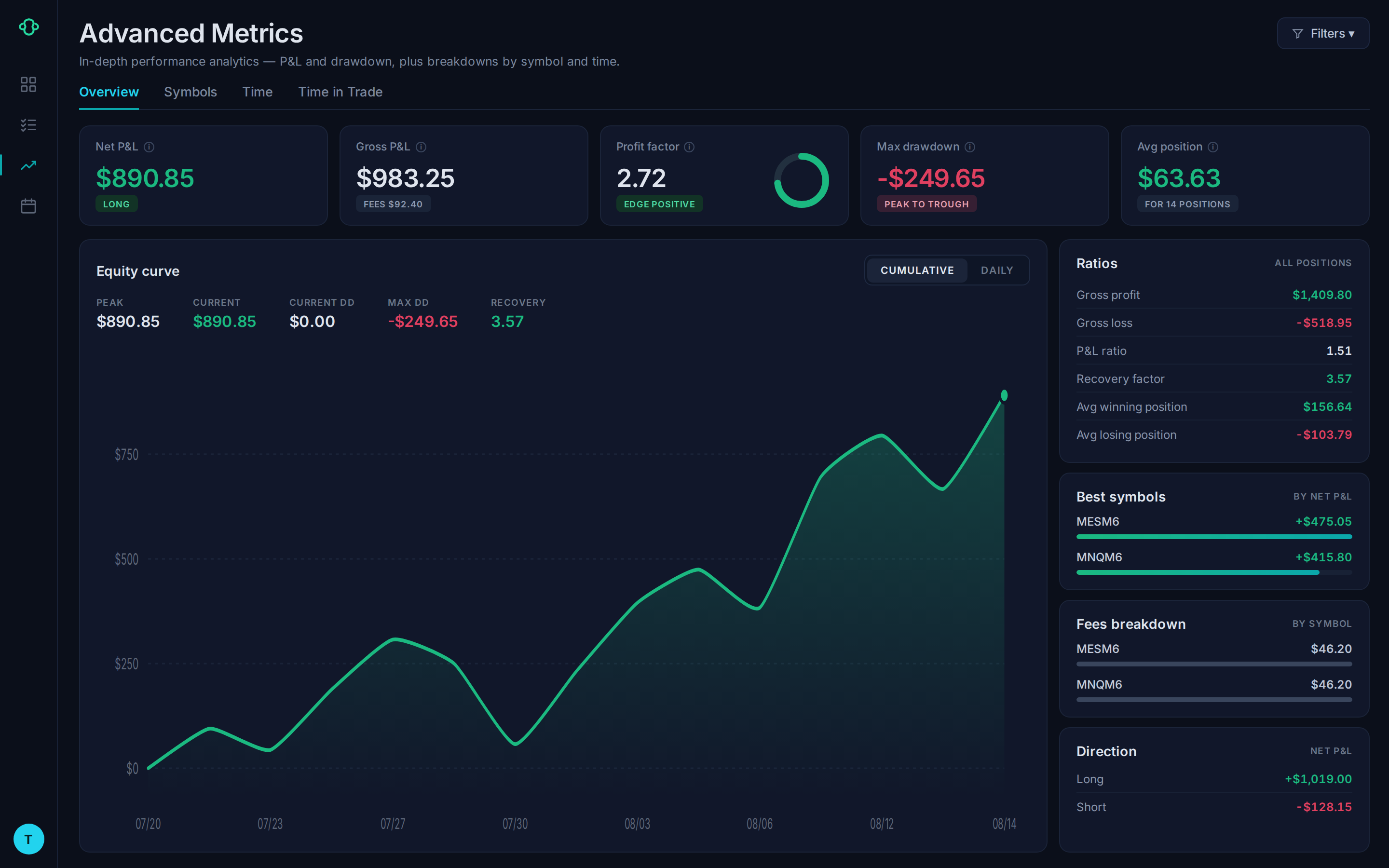
Win rate is only one part of evaluating trading results. Review profit factor, historical expectancy per trade, maximum drawdown, and other performance statistics calculated from your trade data—all available when you log in.
- Profit factor — is your edge mathematically real?
- Expectancy per trade — your true average outcome
- Max drawdown — your worst stretch, measured
- Equity curve — visualize your P&L growth over time
- Recovery factor and P/L ratio — know your resilience
Simulated data shown for illustrative purposes only.
Simulated data shown for illustrative purposes only.
Trade Story
Every trade tells a story.
Start reading them.
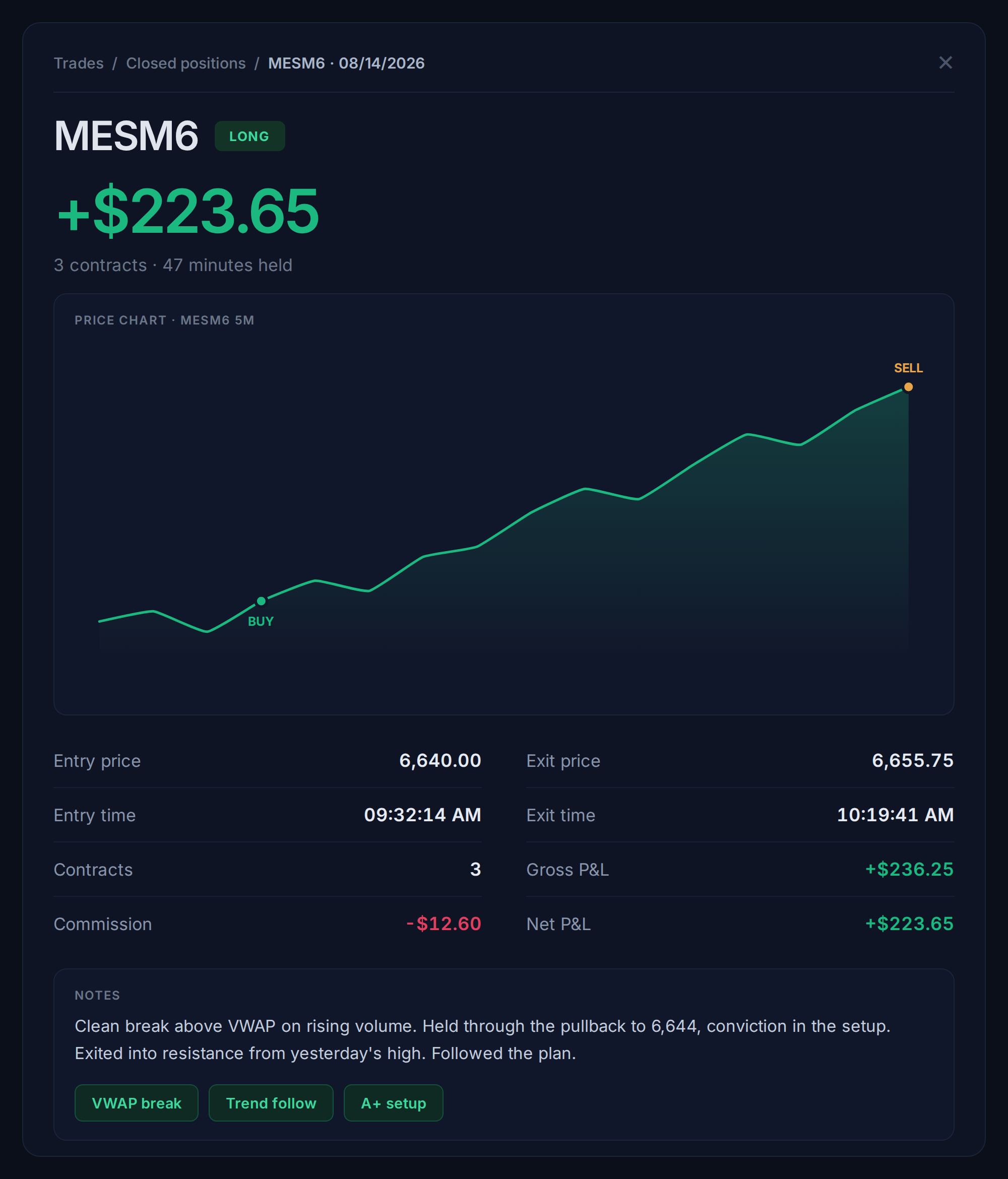
Review the details of each trade, including entry, exit, P&L, and your personal notes. Tag setups, filter trades by outcome, and identify patterns in your trading activity without manually sorting through a spreadsheet.
- Full entry and exit detail on every trade, auto-populated
- Notes and tags: build a searchable trade library
- Filter by symbol, date, session, or outcome
- Spot overtrading patterns by time of day
Everything Included
What's in Your Journal
Every feature. $5/month with your funded account. Active the moment you connect TradingView.
Real-Time Trade Sync
Trades populate from TradingView the moment they fill. No manual input, ever.
Equity Curve
Visualize changes in your account performance over time. Monitor historical drawdowns and review how your trading and risk-management decisions affected your results.
Profit Factor & Expectancy
The two stats that actually tell you if your trading edge is mathematically real.
Time-of-Day Heatmap
See exactly when you perform best — and when you should step away from the screen.
Trade Tags & Notes
Label setups, record reasoning, and build a searchable library of every decision.
Trade Filtering
Filter by symbol, date, session, or outcome. Find patterns hidden in your history.
Drawdown Tracking
Max drawdown duration and depth — know your worst periods and what caused them.
Monthly P/L Calendar
See your daily profit and loss at a glance — green days, red days, and total trades per session.
Performance by Instrument
See your win rate, P&L, and trade count broken down by symbol — know which markets you trade best.
How We Compare
Why pay $20–$50/month for a journal
when Optimus costs just $5?
Standalone trading journals charge a full subscription on top of your broker fees. With Optimus, your journal is part of your account.
What Traders Say
Real Feedback From Real Traders
You already trade on TradingView.
Your journal should know it.
Connect Optimus as your broker, fund your account, and every trade you execute logs itself in real time, automatically. Just $5/month, no separate subscription.
$500 minimum deposit · Journal from $5/month
FAQ
Frequently Asked Questions
How much does the journal cost?
The TradingView connection requires a CQG datafeed fee of $5 per month, billed directly by CQG and outside of Optimus Futures control. The journal itself is included free with your funded Optimus account.
Do I need to do anything after I open my account?
Just two steps. Open and fund your Optimus account. Then in TradingView, open the broker panel, select Optimus Futures, and log in with your CQG credentials. Every trade you place after that records automatically.
What platforms does the journal support?
Currently available for TradingView users via CQG datafeed. This is a native, real-time integration not dependent on TradingView CSV export. Optimus Flow integration is in active development.
What futures instruments are supported?
All futures contracts available through TradingView with the Optimus Futures broker connection are supported, including ES, NQ, MES, MNQ, YM, MYM, RTY, M2K, energy, metals, and more.
Do I need a separate account to use the journal?
A second set of credentials is required for journal synchronization. These are provided when journal access is set up, along with step-by-step instructions. This is a one-time setup.
What if I already have a TradingView account?
You keep your existing TradingView setup exactly as it is. Add Optimus Futures as your connected broker in the broker panel. Your charts, indicators, layouts, and watchlists are not affected.
Have more questions?
View our complete FAQ center or reach out to our dedicated support team, we're here to help.
Contact Us